Every year, preventable accidents during machine maintenance claim lives and disrupt operations. The root cause? Energy sources not properly isolated. A lockout tagout procedure PDF isn't just paperwork—it's a blueprint for survival. When workers service equipment, unexpected startup or release of stored energy can lead to amputations, electrocution, or fatalities. A well-documented, accessible, and consistently applied LOTO procedure eliminates these risks.
This guide delivers real-world lockout tagout procedure PDF examples, outlines what makes them effective, and shows how to implement them across different industries. You’ll also find practical templates you can adapt, common pitfalls to avoid, and key compliance insights that go beyond basic OSHA checklists.
Why a Lockout Tagout Procedure PDF Matters
A lockout tagout procedure PDF standardizes safety across shifts, departments, and skill levels. Unlike verbal instructions or memory-based practices, a documented procedure ensures consistency and accountability. It’s not just a liability shield—it’s a training tool, a compliance record, and a reference during audits.
Consider this: A maintenance technician in a food processing plant disables a conveyor belt for repair. Without a written LOTO procedure, they might overlook a secondary hydraulic line. If that line isn’t depressurized and locked, a sudden release could crush limbs. A PDF procedure would list every energy source, required lock points, and verification steps—preventing catastrophe.
Real example: In 2022, OSHA cited a Midwest manufacturing facility after an employee was pulled into an unguarded mixer. Investigation revealed no written LOTO procedure existed. The result? $132,000 in fines and a preventable injury. A single PDF could have saved both.
What Should a Lockout Tagout Procedure PDF Include?
An effective LOTO procedure PDF isn’t just a form—it’s a step-by-step survival guide. Generic templates fail because they don’t reflect actual equipment. Your document must be machine-specific and practical.
Essential Components of a LOTO PDF
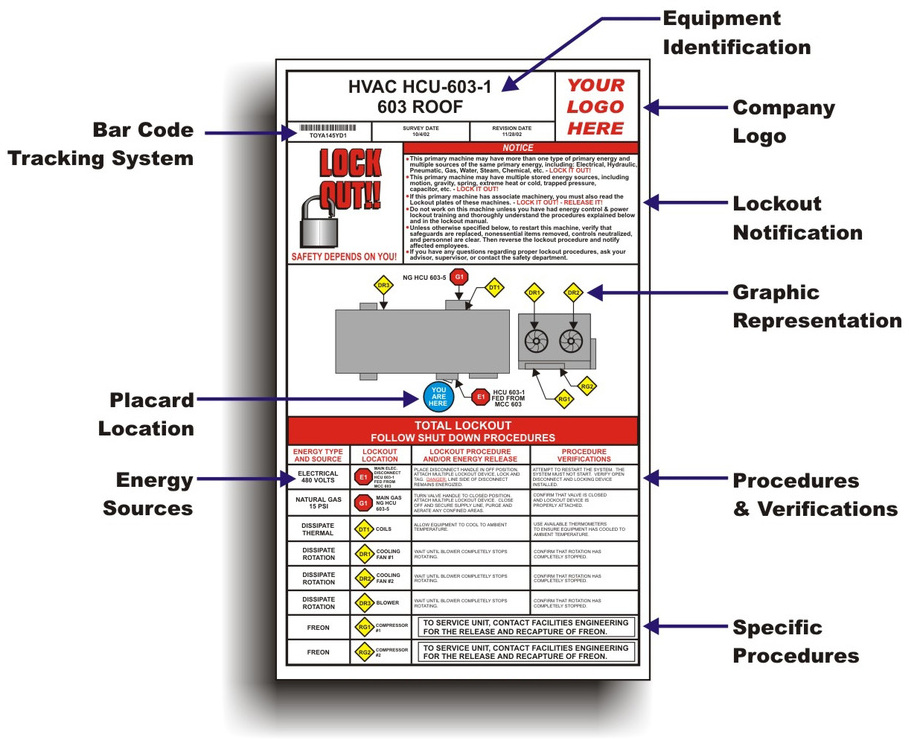
- Equipment Identification
- Name, model, serial number, and location. Avoid vague labels like “Pump #3.” Use “Centrifugal Pump – Model X200 – North Processing Line.”
- Energy Sources
- List all forms: electrical, hydraulic, pneumatic, mechanical, chemical, thermal. Include stored energy (e.g., springs, capacitors, elevated loads).
- Pre-Shutdown Instructions
- Notify affected employees. Prepare lockout devices. Confirm machine is safe to shut down.
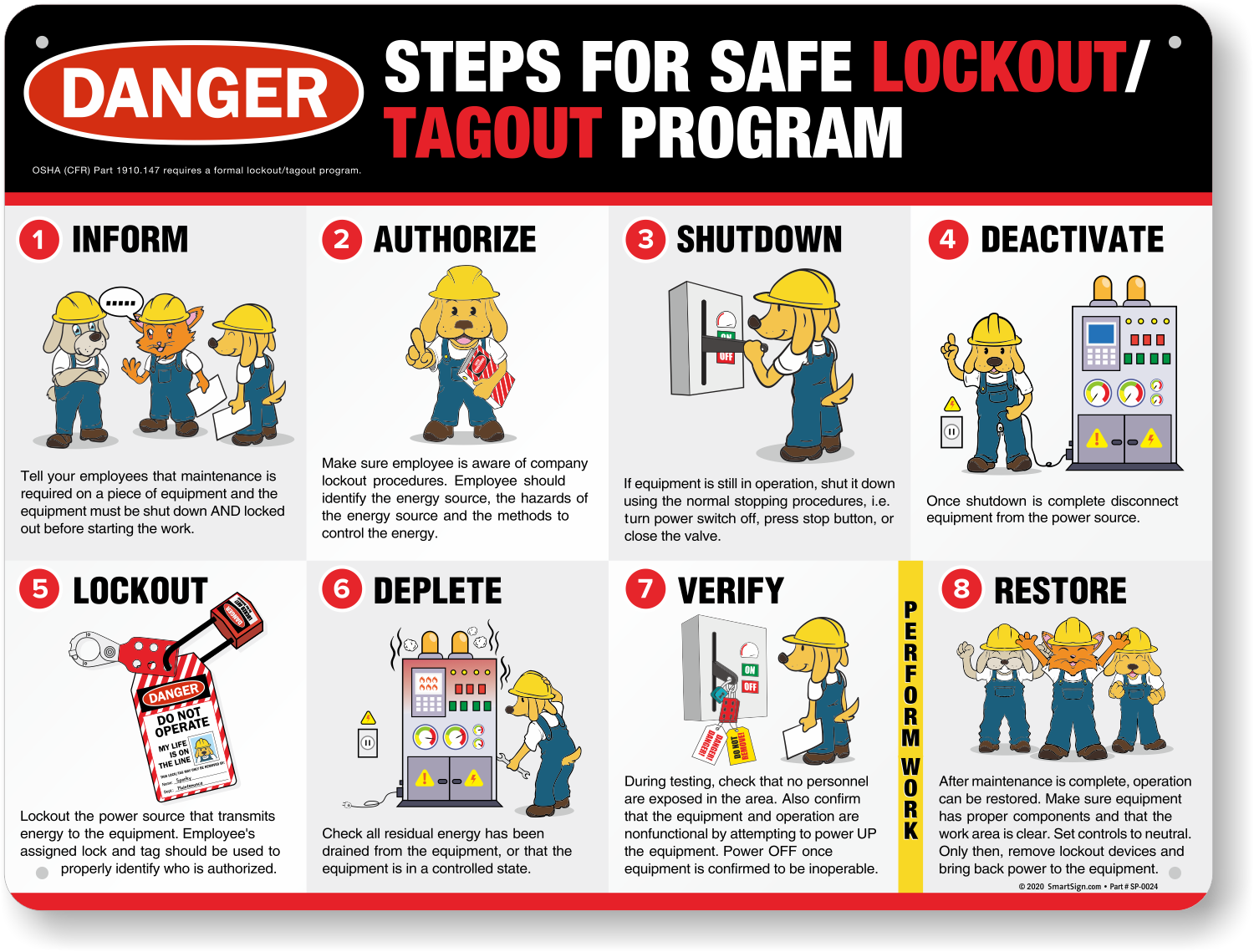
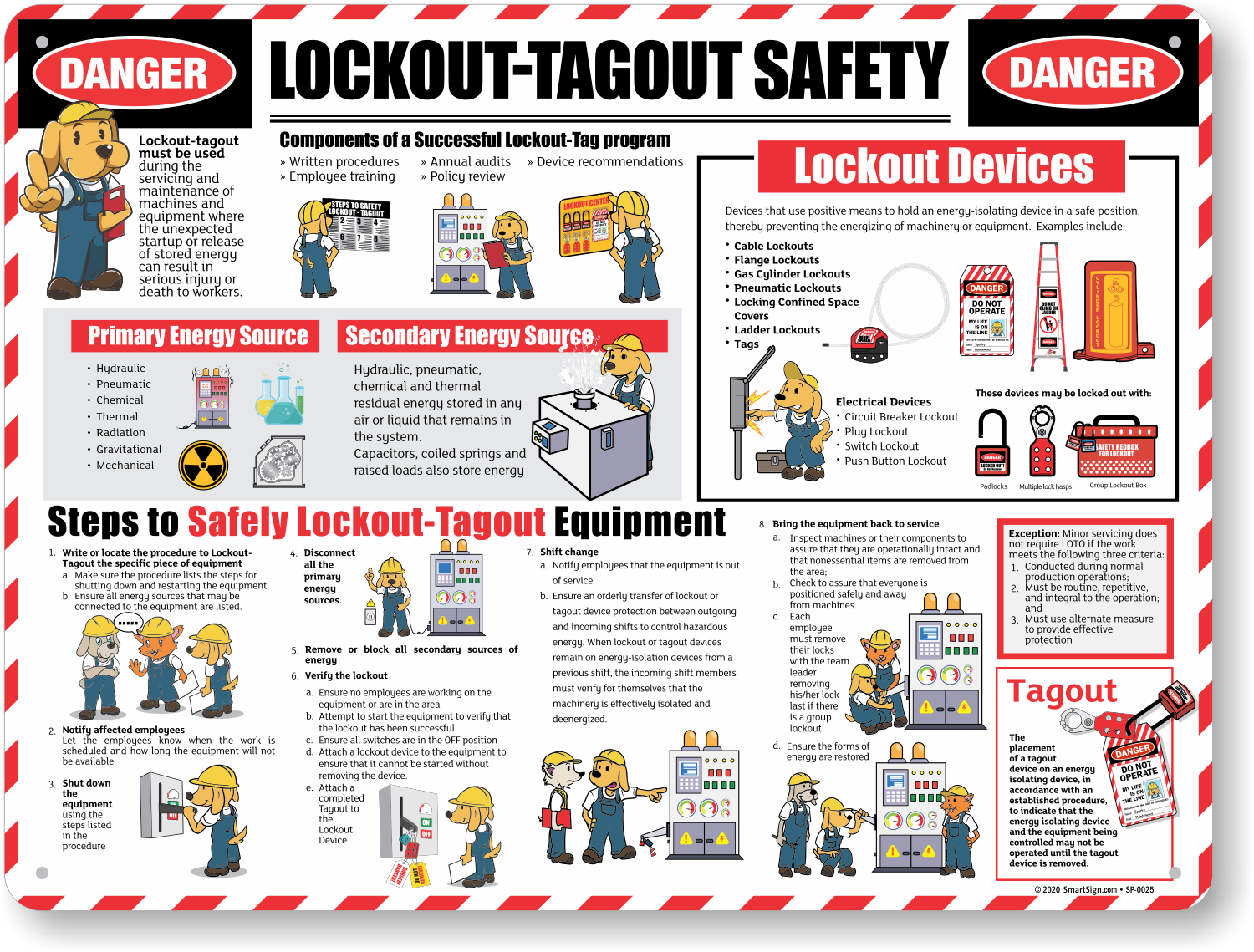
- Step-by-Step Shutdown Sequence
- Power down in correct order. Example: “Close isolation valve → Depressurize line → Shut off main power switch.”
- Isolation Points
- Pinpoint each lockable point (breaker, valve, disconnect). Include photos or diagrams if possible.
- Application of Locks and Tags
- Identify who applies each lock, device type, and tag details (name, date, reason).
- Energy Dissipation Verification
- “Try-start” test: Attempt to restart (without removing locks) to confirm zero energy.
- Restoration Steps
- Clear tools, ensure guards are in place, notify workers, remove locks in reverse order.
- Authorized Personnel List
- Names, roles, and training dates of employees permitted to perform LOTO.
Common Mistakes in Lockout Tagout PDFs
Even experienced safety managers create flawed documents. These errors undermine compliance and safety:
- One-size-fits-all templates: Using a generic PDF for multiple machines ignores unique energy sources.
- Missing verification steps: Skipping the “try-start” test creates false confidence.
- Unclear diagrams: Poorly labeled lock points confuse technicians.
- Outdated info: Equipment changes, but the PDF doesn’t.
- No multilingual support: In diverse workplaces, English-only PDFs exclude workers.
Workflow tip: Conduct a quarterly “LOTO audit.” Print the PDF, walk to the machine, and follow it step-by-step. Mark discrepancies. Update the document within 48 hours.
How to Create a Custom Lockout Tagout PDF
Creating a compliant, usable LOTO procedure PDF takes five steps:
Step 1: Conduct an Energy Audit For each machine, identify every energy source. Use a checklist: - Electrical disconnects - Hydraulic/pneumatic valves - Gravity-fed components - Stored pressure or heat
Step 2: Map Isolation Points Label each point physically and in the PDF. Use standardized tags (e.g., red for electrical, blue for pneumatic).
Step 3: Draft the Procedure Use bullet points, not paragraphs. Include warnings like: > “⚠️ WARNING: Capacitor bank retains charge for 10+ minutes after power-off. Wait 15 minutes before servicing.”
Step 4: Add Visuals Insert annotated photos or line drawings. A tagged valve is clearer than a description.
Step 5: Review and Approve Have safety officers, maintenance leads, and OSHA-trained staff sign off. Store the final PDF in shared drives and print copies near equipment.
Pro insight: Use QR codes on machine tags that link directly to the LOTO PDF. Technicians scan, download, and follow instantly.
Where to Find Free Lockout Tagout Procedure PDF Templates
While custom procedures are best, templates accelerate development. These sources offer downloadable, editable LOTO PDFs:
1. OSHA Official Resources OSHA’s website provides basic LOTO templates aligned with 29 CFR 1910.147. They’re compliant but generic—ideal as a starting point.
2. NIOSH Energy Control Planner
This interactive tool generates PDF procedures based on machine type. You answer questions about energy sources, and it builds a draft.
3. Grainger Safety Hub Industrial supplier Grainger offers free, downloadable LOTO PDFs with diagrams. Their templates include space for photos and multilingual instructions.
4. Creative Safety Supply Provides branded and unbranded LOTO templates. Their “Machine-Specific LOTO Procedure” PDF includes QR code fields and PPE reminders.
5. SafetyCulture (iAuditor) Offers editable LOTO templates in PDF and mobile app format. You can customize, deploy, and audit procedures from one platform.
Warning: Never use a template without adapting it. A boilerplate shutdown step like “turn off power” fails if the machine has dual voltage sources.
Industry-Specific LOTO PDF Examples Different environments demand different approaches:
Manufacturing A CNC machine PDF must address robotic arms, coolant systems, and emergency stops. Example step: “Depressurize robotic arm hydraulics using bleed valve behind control panel.”
Healthcare MRI machines store powerful magnetic energy. LOTO PDFs here require cryogen venting procedures and quench prevention steps.
Utilities A transformer maintenance PDF includes grounding rod placement, arc-flash boundaries, and atmospheric testing before entry.
Food Processing Conveyor systems often have multiple drive points. The PDF must list every roller, drive motor, and gravity chute—even if disconnected remotely.
Case study: A dairy plant reduced maintenance incidents by 78% after switching from verbal LOTO to machine-specific PDFs with photos. Technicians reported 40% faster setup times.
Digital vs. Paper LOTO Procedure PDFs: What Works Best? Many companies still print LOTO PDFs and post them in break rooms. But paper degrades, gets lost, or becomes outdated.
Digital offers advantages: - Instant updates pushed to all devices - Integration with CMMS (Computerized Maintenance Management Systems) - Audit trails showing who accessed the PDF and when - Offline access via mobile apps
Limitation: In high-dust or wet environments, tablets may not be practical. Hybrid approach: digital primary, laminated backup at machine stations.
Tip: Password-protect editable versions. Distribute read-only PDFs to technicians to prevent accidental changes.
Training and Compliance: Using LOTO PDFs Effectively
A perfect PDF fails if workers don’t understand it. Training must include:
- Hands-on walkthroughs using the actual PDF
- Quizzes on energy source identification
- Annual refreshers with updated documents
During audits, OSHA won’t just ask for your LOTO program—they’ll ask for proof of use. Keep logs showing: - PDF revision dates - Training sign-offs - Maintenance records referencing the procedure
Red flag: If your LOTO PDF hasn’t been updated in over two years, it’s non-compliant. Equipment changes, personnel changes—your document must reflect reality.
Final Checklist: Is Your Lockout Tagout PDF Ready?
Before deploying or auditing your LOTO procedure PDF, verify these:
- [ ] Equipment is uniquely identified (not just “Pump A”)
- [ ] All energy sources are listed and isolated
- [ ] Steps are in correct sequence
- [ ] Lock application includes roles and responsibilities
- [ ] Verification method (e.g., try-start) is defined
- [ ] PDF is accessible at or near the machine
- [ ] Document is reviewed and updated annually
A strong LOTO procedure PDF doesn’t just comply—it prevents. It turns routine maintenance into predictable, safe operations. Start with a template, but don’t stop there. Customize, test, and enforce. Your team’s safety depends on it.
FAQ
What is the OSHA standard for lockout tagout procedures? OSHA 29 CFR 1910.147 outlines the Control of Hazardous Energy. It requires written procedures, employee training, and periodic inspections for all servicing of machines.
Can a LOTO procedure PDF be digital only? Yes, if it’s accessible to authorized employees at the point of use. Mobile access, offline capability, and quick retrieval are required.
How often should a lockout tagout PDF be updated? Annually, or immediately after equipment changes, incidents, or process modifications.
Who is responsible for applying locks in a LOTO procedure? Only authorized employees—those trained and certified in energy control—can apply locks and tags.
Should contractors have access to LOTO PDFs? Yes. Host employers must provide contractors with site-specific LOTO procedures and ensure they follow them.
Can one LOTO PDF cover multiple machines? Only if the machines are identical in function, energy sources, and shutdown steps. Otherwise, each machine needs a unique procedure.
What’s the difference between lockout and tagout? Lockout uses physical locks to isolate energy. Tagout uses warning tags alone. Tagout is less secure and only allowed if locks aren’t feasible, with additional safety measures.
FAQ
What should you look for in Lockout Tagout Procedure PDF: Templates and Best Practices? Focus on relevance, practical value, and how well the solution matches real user intent.
Is Lockout Tagout Procedure PDF: Templates and Best Practices suitable for beginners? That depends on the workflow, but a clear step-by-step approach usually makes it easier to start.
How do you compare options around Lockout Tagout Procedure PDF: Templates and Best Practices? Compare features, trust signals, limitations, pricing, and ease of implementation.
What mistakes should you avoid? Avoid generic choices, weak validation, and decisions based only on marketing claims.
What is the next best step? Shortlist the most relevant options, validate them quickly, and refine from real-world results.